Concept
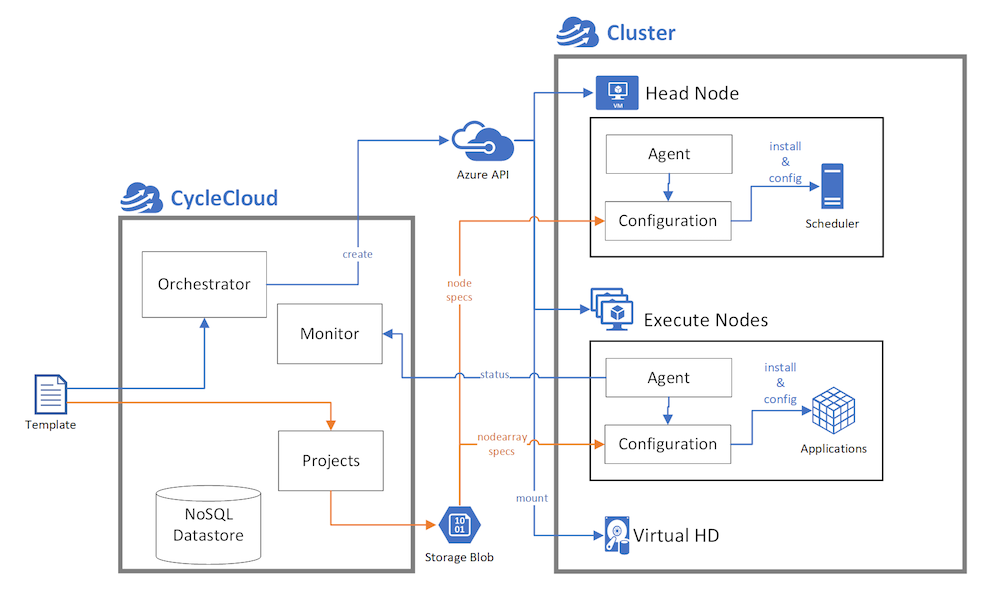 Image from CycleCloud Microsoft Learn.
- The VM where CycleCloud resides. It orchestrates (e.g., scales up and down, allocate new nodes) the HPC cluster.
- CycleCloud downloads template from storage. Templates are specification of how to set up the nodes. For example, the hardware, the initialization script.
- CycleCloud comes with monitor. It gathers information (e.g., read / write speed) from agents in the nodes.
- Computing nodes are allocated as VM scaleset, and the scaleset scales up and down when allocation and deacllocation.
- CycleCloud and the cluster needs to be in the same VNet, otherwise we need peering.
Locker and Storage
A locker is simply an Azure Blob Storage container that CycleCloud uses as a file storage backend. It’s where CycleCloud stores all the files that nodes need to configure themselves when they start up.
Think of it as a shared folder in the cloud—every node in your cluster downloads files from here when it boots.
1
cyclecloud locker list # shows the locker (storage account) we have
CycleCloud CLI
CLI is really hard to use… I would recommend Wizard.
- Initialize
1
 cyclecloud initialize
Treat the prompt like the login on the CycleCloud UI.
- Create a new empty project:
1
 cyclecloud project init
- Upload to storage account, so that every cluster nodes can download them:
- This is important, the nodes (VMs and VM Scale Sets) will download these files to initialize itself.
1
2
 cyclecloud locker list # list lockers (storage account)
 cyclecloud project upload <locker name>
- This is important, the nodes (VMs and VM Scale Sets) will download these files to initialize itself.
- Import the template:
1
2
 cyclecloud project info # will get you the project name of this folder.
 cyclecloud import_template nfs -f templates/nfs.txt --force
- Create the cluster from the template:
1
 cyclecloud create_cluster <template_name> <give it a name>
- Show to cluster we have and start:
1
2
 cyclecloud show_cluster
 cyclecloud start_cluster
Template Project Structure
1
2
3
4
5
6
7
8
9
10
11
12
13
14
15
16
├── blobs
├── project.ini
├── specs
│   └── default
│       ├── chef
│       │   ├── data_bags
│       │   ├── roles
│       │   └── site-cookbooks
│       └── cluster-init
│           ├── files
│           │   └── README.txt
│           ├── scripts
│           │   └── README.txt
│           └── tests
│               └── README.txt
└── templates
specs/default/cluster-init/files: Files in this directory are automatically synced to any node using this spec. (Ex: software packages, config files)specs/default/cluster-init/scripts: Files in this directory are executed on the host in alphabetical order.
CycleCloud UI
Follow the wizard.