How to Set Up Slurm Database for Job Accounting?
Setting Up Slurm Database Service
In CycleCloud Wizard Advanced Settings Slurm Settings:
- These parameters will be stored in
/sched/<cluster-name>/slurmdbd.conf.
Form How to Database URL Get private DNS in MySQL Flexible Server overview. Database name Setting Up MySQL Flexible Server Database user Setting Up MySQL Flexible Server Database password Setting Up MySQL Flexible Server SSL Certificate URL Select AzureCA.pem- These parameters will be stored in
Log in to the scheduler, where the Slurm service is running (see Scheduler). We can connect to the scheduler as long as it is launched, even though the CycleCloud wizard might show there is an error while setting up Slurm.
Copy the SSL certificate of the MySQL database (see Setting Up MySQL Flexible Server) to the scheduler.
Move the SSL certificate to
/sched/<cluster_name>folder:1 2 3
sudo mv Cert.pem /sched/<cluster_name>/. cd /sched/<cluster_name> sudo cp Cert.pem AzureCA.pem # a soft link point to this file
Restart
slurmdbdandslurmctldservice:1 2
sudo systemctl restart slurmdbd sudo systemctl restart slurmctld
Check that we can use job accounting in Slurm:
1
sacct    # print an empty table
Set Default Time
Azure CycleCloud puts Slurm partition (nodes) settings in
/sched/<cluster-name>/azure.conf, and it is then imported it inslurm.conf. If we put another partition specification inslurm.conf, we will get errors.
- Add
DefaultTimeinazure.conf:1 2
PartitionName=hpc Nodes=neptune-hpc-[1-24] DefaultTime=01:00:00 Default=YES DefMemPerCPU=7782 MaxTime=INFINITE State=UP Nodename=neptune-hpc-[1-24] Feature=cloud STATE=CLOUD CPUs=16 ThreadsPerCore=1 RealMemory=124518
DefaultTimesets the fallback runtime limit for any job submitted to a partition without an explicitly defined--timeduration.
Enforce Slurm Job Accounting
Add this in
slurm.conf(in/sched/<cluster-name>/slurmd.conf):1
AccountingStorageEnforce=associations,limits,safe
associations: This will prevent users from running jobs if their association is not in the database.limits: This will enforce limits set on associations and qos’.safe: This will ensure a job will only be launched when using an association or qos that has a TRES-minutes limit set if the job will be able to run to completion. With the ‘safe’ option set, a job won’t be killed due to limits. Which is a job won’t be killed due to limits, even if the limits are changed after a job was started.
Restart
systemctldservice.1
sudo systemctl restart slurmctld
Slurm Database
We first need to set a user to have admin level, then we can operate the slurm database. There are three levels, from top to bottom:
cluster,account,user. The former includes the latter objects.associationcan be either one of them limited to the scope itself.
Set user as admin:
1
2
  sudo -i
  sacctmgr add user Name=<user> AdminLevel=Admin Account=root
Generally, Slurm database already has
clustercreated:1
sacctmgr list cluster
Create an
account:1 2
sacctmgr add account <account> Cluster=<cluster> Description="<description>" sacctmgr list account
Create a
user:1
sacctmgr add user <user> Account=<account>
This gives
userthe permission to submit jobs, if we have enforce job accounting. We still need to set resource limits.List associations:
1
  sacctmgr list associations
Modify and Check User Resource Limits
Set resource limits to user (there are tons of options, see slurm documents), for example, this assign 10 min cpu core time (
2 cpu x 5 min ~ 10):1
sacctmgr modify user <user> set GrpTRESMins=cpu=10
Reset to default:
1
  sacctmgr modify user <user> Account=<account> set GrpTRESMins=cpu=-1
Get historical job runtime:
1
  sacct -u <user> --format=JobID,CPUTimeRAW,ElapsedRaw,NCPUS,State
If it doesn’t show up anything, it may be you didn’t set the time range. Try:
1
sacct -u <user> --starttime=2026-01-01
Count the accumulated time:
1
  sacct -u test-user --format=CPUTimeRAW -n | awk '{sum += $1} END {print sum/120, "CPU-minutes"}'
CPUTimeRAWis in second, and each job takes two rows. So we need to divide the sum by60for converting sec to min and divide it by2.
FAQs
Unknown Server Host
- Details:
1
  error: mysql_real_connect failed: 2005 Unknown server host
slurmdbd service cannot comprehend the private DNS you provide. Remember to add VNet in private DNS records.
Database settings not recommended values
- Details:
1
  error: Database settings not recommended values: innodb_buffer_pool_size innodb_lock_wait_timeout
Should change these parameters in MySQL Flexible Server.
Slurm
- Reference: https://slurm.schedmd.com/
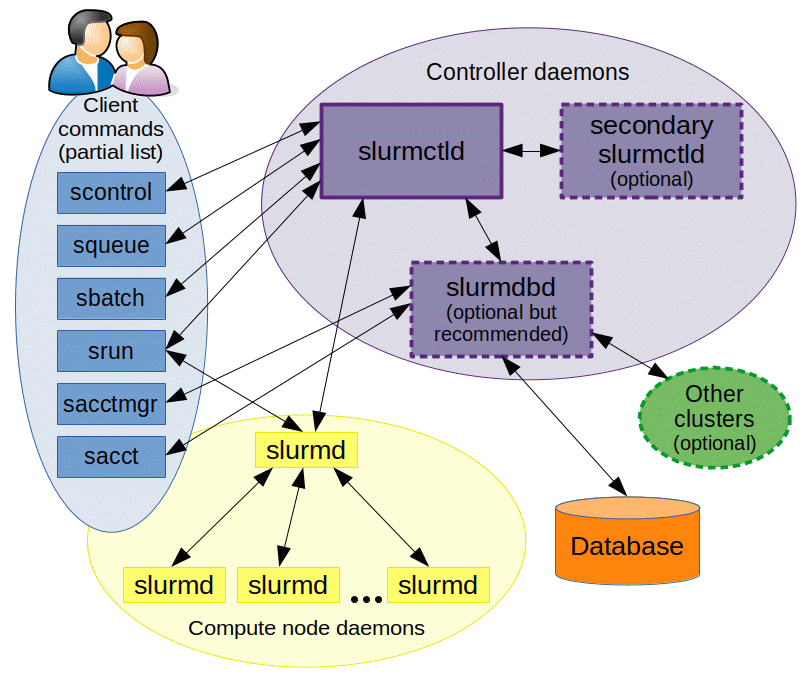 Image from Slurm Documentation (https://slurm.schedmd.com/)
slurmctld: Slurm manager on schedular1
sudo systemctl status slurmctldslurmd: slurm daemon on computing nodeslurmdbd: Slurm DataBase Daemon for record accounting information for multiple Slurm-managed clusters in a single database.
Configuration
- Show which slurm conf it is using:
1
scontrol show config | grep SLURM_CONF slurm.confforslurmctlddaemon, andslurmdbd.confforslurmdbddaemon:1
slurmctld -> (AccountingStorageType)-> slurmdbd -> (StorageType) -> database
- CycleCloud stores all the slurm configuration file in
/sched/<cluster_name>. The files and changes will not be gone during restart and after termination.