
Target Structure and Goal
/shared is a shared file system that will also be mounted in all the computing nodes.
Our target folder structure is:
1
2
3
4
5
6
7
8
9
10
11
/shared
├── spack/
│ ├── opt/             # spack installed software
│ └── var/
├── modules/           # all the modulefiles stored in hierarchical structure
│ └── linux-x86_64/
└── maintainence/
│ └── user/
│   └── z01_lmod.sh    # store all the export path to MODULEPATH
└── software/          # manually installed software
  └── openmpi/
The goal is to make admin the one to use spack to install software, and then use Lmod to load and unload software.
- spack is a package management tool designed to support multiple versions and configurations of software on a wide variety of platforms and environments.
- Lmod is a module system that solves hierarchical dependency problem where
tclmodule cannot solve.
How to Set Up Spack and Lmod?
All of the software will be installed in a shared folder, that can be mounted to the compute node. If login node and the compute node are not using the same machine settings, we need to use the compute node to compile and install the software.
Follow spack doc
Get
spack:1 2 3
sudo apt update sudo apt install file bzip2 ca-certificates g++ gcc gfortran git gzip lsb-release patch python3 tar unzip xz-utils zstd git clone --depth=2 https://github.com/spack/spack.git
Load
spackenvironment source:1
source spack/share/spack/setup-env.shFind and list compiler,
spackcompiles software and build hierarchy module trees based on these:1 2
spack compiler find spack compiler list
Find scheduler, since we need parallel computing that orchestrate multiple nodes:
1
2
spack external find slurm
spack external find
Make the folder readable by all and writable by the admin:
1
2
sudo mkdir /shared/spack
sudo chown -R admin_acc:admin_acc /shared/spack
Edit spack config (in
~/.spack):config.yaml(dospack config edit config):1 2 3 4 5 6 7 8 9
config: install_tree: root: /shared/spack/opt projections: all: "{architecture.platform}-{architecture.target}/{name}-{version}-{hash}" build_stage: - /shared/spack/stage test_stage: /shared/spack/test source_cache: /shared/spack/var/spack/cache
Install Lmod:
- Find packages and list there:
1
2
 spack info lmod
 spack install lmod@8.7.67
- Find packages and list there:
Enable automatically generating Lmod modulefiles for
spackinstallation and make it ignore Lmod:modules.yaml(dospack config edit modules):1 2 3 4 5 6 7 8 9 10 11 12 13 14 15 16 17 18 19 20 21 22 23 24 25 26 27 28 29 30 31 32 33 34 35 36 37 38 39 40 41
modules: # This maps paths in the package install prefix to environment variables # they should be added to. For example, <prefix>/bin should be in PATH. prefix_inspections: ./bin: - PATH ./man: - MANPATH ./share/man: - MANPATH ./share/aclocal: - ACLOCAL_PATH ./lib/pkgconfig: - PKG_CONFIG_PATH ./lib64/pkgconfig: - PKG_CONFIG_PATH ./share/pkgconfig: - PKG_CONFIG_PATH ./: - CMAKE_PREFIX_PATH # These are configurations for the module set named "default" default: # Where to install modules roots: lmod: /shared/modules enable: [lmod] lmod: # only those packages I've explicitly installed are exposed by module avail hide_implicits: true # we will load lmod manually exclude: - "lmod" # hash length for the visible packages to the users hash_length: 0 projections: all: "{name}/{version}" ^mpi: "{name}/{version}" hierarchy: - "mpi" - "python"
- Grant permission for
spackto write module files:1 2
sudo mkdir /shared/modules sudo chown -R admin_acc:admin_acc /shared/modules
Refresh to make
spackfollow the new modules config:1
spack module lmod refresh
Lmod Env and MODULEPATH
Use Lmod:
1
source $LMOD_ROOT/lmod/lmod/init/profile
Export spack generated module files to MODULEPATH:
1
export MODULEPATH=/blabla:$MODULEPATH
lmod will list every module file found in the path, even if the path is duplicated.
Install MPI and Make spack Recognize It
We need to manually install MPI, following this Azure: Set up Message Passing Interface for HPC.
1
2
3
4
5
6
7
8
sudo apt install libiberty-dev

export LD_LIBRARY_PATH=/opt/hpcx-v2.25.1-gcc-doca_ofed-ubuntu22.04-cuda13-x86_64/hcoll/lib:$LD_LIBRARY_PATH


./configure --prefix=/shared/software/openmpi/4.1.8 --with-ucx=/opt/hpcx-v2.25.1-gcc-doca_ofed-ubuntu22.04-cuda13-x86_64/ucx --with-hcoll=/opt/hpcx-v2.25.1-gcc-doca_ofed-ubuntu22.04-cuda13-x86_64/hcoll --with-pmix=/opt/pmix/4.2.9 --enable-mpirun-prefix-by-default --with-platform=contrib/platform/mellanox/optimized

sudo make install
Remember to install other system requirement packages in Cloud-init.
Register external package in spack (
spack config edit packages):1 2 3 4 5 6 7 8 9 10 11 12
openmpi: externals: - spec: openmpi@4.1.8 prefix: /shared/software/openmpi/4.1.8 modules: - openmpi/4.1.8 extra_attributes: compilers: c: /usr/bin/gcc cxx: /usr/bin/g++ fortran: /usr/bin/gfortran buildable: false
Spack should be able to know
openmpi:1
spack external list # should have openmpi printedInstall other software based on this external dependency:
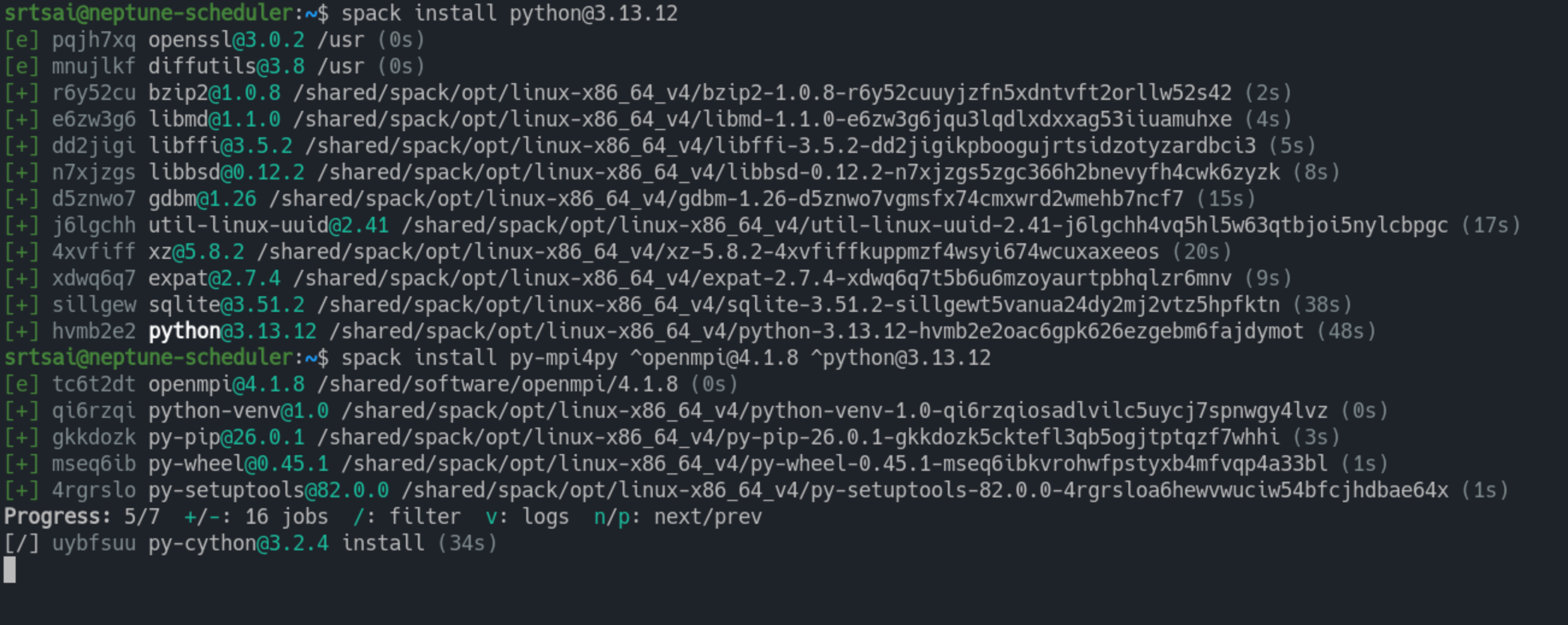
There is
[e]meaning external duringpy-mpi4pyinstallation.![Installation based on external dependency]()
Install Software and Refresh Lmod Module Files
List packages:
1
spack list <package_name>
Get info of a package:
1
spack info <package_name>
Install software:
1
spack install python@3.13.12
Install software based on some previously installed dependency:
1
spack install py-mpi4py ^openmpi@4.1.8 ^python@3.13.12
Refresh Lmod Module Files:
1
spack module load refresh
How To Make Lmod the Default in CycleCloud and Export MODULEPATH
Linux loads all the script in /etc/profile.d/, so we will create soft link from the /shared (files in here will persist even after termination of the node).
Go to CycleCloud Wizard -> Edit -> Cloud-init.
Cloud-init script:
1
2
3
4
5
6
7
8
9
10
11
12
#cloud-config

runcmd:
  # wait for mount
  - timeout 120 bash -c 'until mountpoint -q /shared; do sleep 3; done'

  # load lmod and remove cyclecloud env module
  - ln -s $LMOD_INSTALL_PREFIX/lmod/lmod/init/profile /etc/profile.d/z00_lmod.sh
  - ln -s /shared/maintainence/user/z01_lmod.sh /etc/profile.d/z01_lmod.sh
  - rm /etc/profile.d/modules.sh

  # other dependencies if necessary
I have to say I am not sure if this is the correct way. Because I tried two different clusters, and one work the other doesn’t. The other way is to let users call
source z00_lmod.shandsource z01_lmod.shthemselves.